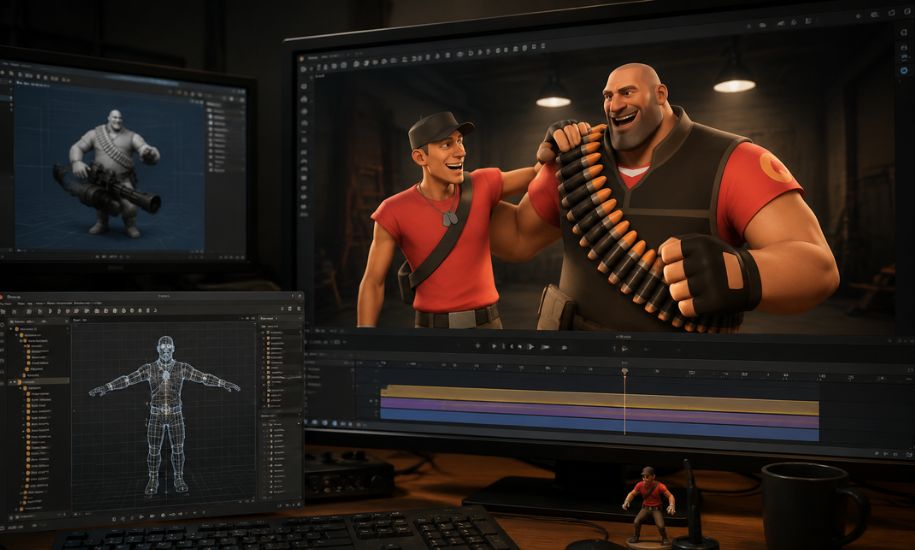
Creating cinematic animations, game-inspired movies, and creative 3D scenes requires more than just imagination. Behind many impressive Source Filmmaker projects is a technical process that allows artists to bring custom characters, objects, and environments into the animation software. SFM Compile is an important part of this workflow because it transforms raw 3D assets into formats that Source Filmmaker can understand and use effectively.
For beginners, the compilation process may seem complicated because it involves different file types, modeling tools, and technical settings. However, once the basic concepts are understood, creators can unlock new possibilities by adding personalized models, animations, and textures to their projects.
Understanding Source Filmmaker and Its Creative Possibilities
Source Filmmaker (SFM) is an animation and video production tool developed by Valve. It uses the Source Engine, the technology behind games such as Team Fortress 2 and Half-Life 2. The software allows creators to produce animated films, game-style cinematics, character scenes, and storytelling projects using 3D models.
Unlike traditional video editing software, SFM works with game assets inside a virtual environment. Users can position characters, control lighting, adjust camera movements, and create detailed animations. However, the software depends on specific file formats, meaning that external models often require preparation before they can appear correctly.
This is where the compilation process becomes essential.
What Is SFM Compile?
SFM Compile refers to the process of converting 3D models, animations, and related resources into formats compatible with Source Filmmaker. Artists often create assets in programs like Blender, Maya, or 3ds Max, but these files cannot always be directly imported into SFM.
Compilation prepares these resources by converting them into Source Engine formats. During this process, information such as model structure, textures, bones, physics settings, and animations is organized so that the final asset works properly inside the software.
For creators who develop custom characters or environments, compilation is a key step between designing an asset and using it in an animation project.
How the SFM Compilation Process Works
The process usually involves several stages, starting with the creation of a 3D asset and ending with a working model inside Source Filmmaker.
Creating and Preparing the Model
The first stage involves designing or modifying a 3D model. Artists commonly use applications such as Blender or Autodesk Maya to create characters, objects, and environments.
During preparation, creators focus on important details such as:
- Model shape and geometry
- Bone structures for movement
- Material settings
- Texture placement
- Animation compatibility
A properly prepared model reduces errors during later stages of compilation.
Exporting Source-Compatible Files
After completing the model, it must be exported into formats supported by the Source Engine. Common formats include SMD and DMX files.
These files contain important information about the asset, including:
- Mesh data
- Skeleton information
- Animation sequences
- Material references
The exported files act as the foundation for the next stage.
The Role of QC Files in SFM Compile
One of the most important parts of the compilation workflow is the QC file. This text-based script provides instructions to the Source Engine compiler.
A QC file can define:
- The model name
- File locations
- Animation sequences
- Texture paths
- Physics properties
- Bone settings
Without a properly configured QC file, the compiler may fail or create an asset that does not function correctly in Source Filmmaker.
Understanding QC files is especially useful for advanced creators who want complete control over their custom models.
Essential Tools Used for SFM Compilation
Several tools help artists complete the compilation process efficiently.
Crowbar
Crowbar is one of the most commonly used community tools for Source Engine model work. It helps creators compile and decompile models, manage files, and test different settings.
For many beginners, Crowbar provides a simpler interface compared with using command-line tools.
StudioMDL
StudioMDL is Valve’s official model compiler. It converts prepared files into Source Engine model formats that can be recognized by supported applications.
Although it is powerful, new users may need time to understand its technical requirements.
Blender Source Tools
Many modern creators use Blender because it is free and offers powerful modeling features. Blender Source Tools help export assets into formats suitable for Source Engine workflows.
Texture Conversion Tools
Textures often need conversion before they work correctly. Tools that support Valve’s texture formats help transform image files into usable materials for SFM projects.
Common SFM Compile Problems and Solutions
Working with custom assets can sometimes create technical challenges. Understanding common problems can save time during development.
Missing Textures
A model may appear without colors or details if texture paths are incorrect. Checking material files and ensuring that textures are stored in the correct folders can solve this issue.
Broken Animations
Characters may appear frozen or display incorrect movements when animation files are not properly configured. Reviewing bone structures and animation settings usually helps fix these problems.
Compilation Errors
Errors can occur because of:
- Incorrect QC commands
- Missing files
- Wrong folder locations
- Unsupported settings
Carefully checking each file reference is often the best way to identify the cause.
Models Not Appearing in SFM
If a compiled model does not appear inside Source Filmmaker, creators should verify that the final files have been placed in the correct game directory and that the model paths match the configuration.
Benefits of Learning SFM Compile
Learning this process gives creators greater freedom and control over their projects. Instead of relying only on existing assets, artists can introduce unique characters, custom props, and personalized environments.
Some major advantages include:
- Creating original animation content
- Customizing existing game assets
- Developing professional-looking scenes
- Expanding creative possibilities
- Improving technical knowledge of 3D workflows
For filmmakers and digital artists, understanding compilation creates a bridge between modeling software and animation production.
Tips for Beginners Working With SFM Compile
New creators should start with simple projects before attempting complex character models. Learning basic file structures, folder organization, and material handling can make the process much easier.
Helpful practices include:
- Keeping project files organized
- Testing models regularly
- Learning basic QC editing
- Understanding Source Engine requirements
- Backing up original files
Patience is important because technical problems are a normal part of learning any 3D workflow.
The Future of Custom Animation Workflows
Although Source Filmmaker has been available for years, it continues to have an active creative community. Many artists still use it for storytelling, fan animations, and experimental projects.
As 3D tools continue to improve, workflows connecting modeling software with animation platforms are becoming more accessible. The skills learned through SFM Compile can also help creators understand broader concepts used in game development and digital animation.
Conclusion
Creating custom content for Source Filmmaker involves creativity, technical knowledge, and attention to detail. SFM Compile plays a central role in transforming original designs into functional assets that can be used for animation and cinematic projects. By learning the tools, file formats, and compilation workflow, creators can develop more unique and professional SFM experiences.
For readers interested in technology, digital creativity, and emerging online trends, Insider Newz continues to provide informative guides and detailed articles covering topics that help audiences understand modern tools and creative platforms.