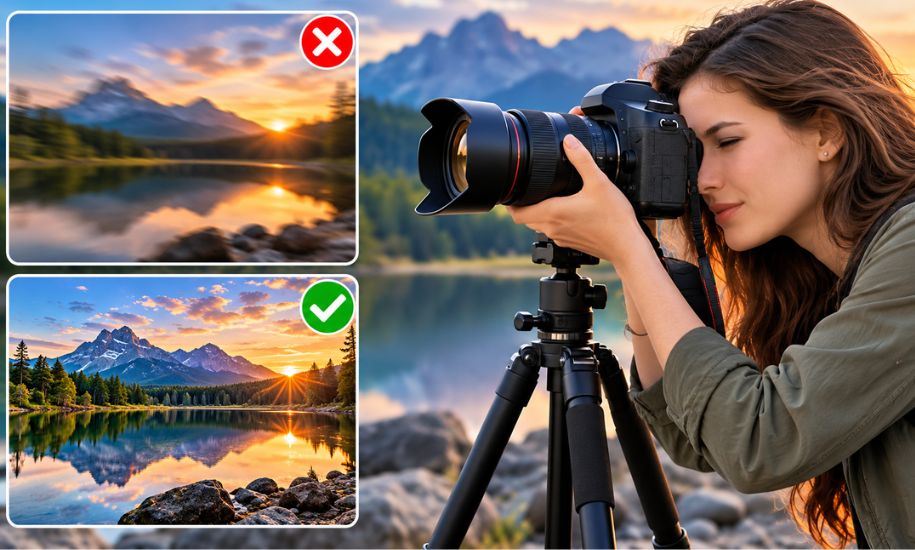
Whether you’re capturing a breathtaking landscape, documenting a family event, or experimenting with creative photography, blurry images caused by shaky hands can quickly become frustrating. Fortunately, camera shake is a common issue with practical solutions. By improving your shooting technique, adjusting camera settings, and using the right accessories, you can significantly increase the sharpness of your photos. This guide explores proven methods to help photographers of all experience levels achieve crisp, professional-looking images without relying solely on expensive equipment.
Why Photos Become Blurry from Camera Shake
Before fixing the problem, it’s important to understand what causes it. Camera shake occurs when the camera moves slightly while the shutter is open. Even the smallest movement can create noticeable blur, particularly in low-light conditions or when using a zoom lens.
Several factors contribute to camera shake, including:
- Slow shutter speeds
- Poor handholding technique
- Low-light environments
- Heavy camera bodies or lenses
- Fatigue during long photography sessions
- Natural hand tremors
- Pressing the shutter button too forcefully
Recognizing these causes makes it easier to choose the right solution for each shooting situation.
Master Proper Camera Holding Techniques
One of the easiest improvements comes from learning how to hold your camera correctly. Stable posture reduces unwanted movement and increases the chances of capturing sharp images.
A few effective habits include:
- Hold the camera with both hands.
- Keep your elbows tucked close to your body.
- Stand with your feet shoulder-width apart for balance.
- Bring the camera close to your face instead of extending your arms.
- Lean against a wall, tree, or other stable surface whenever possible.
These simple adjustments often make a noticeable difference without changing any camera settings.
Use Faster Shutter Speeds
Among all solutions for How to Fix Shaky Hands Photography, increasing shutter speed is one of the most effective.
A faster shutter captures the scene before hand movement has time to affect the image. As a general guideline, photographers often use a shutter speed equal to or faster than the reciprocal of the lens focal length. For example:
- 50mm lens: at least 1/60 second
- 100mm lens: at least 1/125 second
- 200mm lens: at least 1/250 second
When photographing moving subjects, even faster shutter speeds may be necessary to freeze motion completely.
Adjust ISO and Aperture for Better Results
Sometimes increasing shutter speed isn’t possible without changing other settings. That’s where ISO and aperture become valuable tools.
Raising the ISO allows the camera sensor to capture more light, enabling faster shutter speeds in darker conditions. While higher ISO values may introduce some digital noise, a slightly grainy image is usually preferable to a blurry one.
Using a wider aperture, such as f/1.8 or f/2.8, also allows more light into the camera. This supports faster shutter speeds while creating attractive background blur for portraits and close-up photography.
Finding the right balance between shutter speed, aperture, and ISO is one of the most valuable photography skills to develop.
Take Advantage of Image Stabilization
Many modern cameras and lenses include built-in stabilization technology designed to reduce minor hand movements.
Depending on your equipment, this feature may appear as:
- Optical Image Stabilization (OIS)
- In-Body Image Stabilization (IBIS)
- Lens stabilization systems from various manufacturers
Image stabilization works especially well when shooting handheld in moderate lighting conditions. However, it should not be considered a replacement for proper shooting technique or a tripod during very long exposures.
Improve Your Breathing Technique
Professional photographers often pay close attention to breathing while taking photos.
A steady breathing rhythm helps minimize body movement.
Try this simple technique:
- Take a slow breath.
- Exhale gently.
- Press the shutter smoothly during the exhale.
- Avoid sudden or jerky finger movements.
Although this may seem like a small adjustment, it can improve image sharpness during handheld shooting.
Use Burst Mode to Increase Your Chances
Even experienced photographers don’t expect every single frame to be perfect.
Burst mode captures several images in rapid succession, increasing the likelihood that one will be exceptionally sharp. Tiny differences in hand movement occur between each frame, making this feature especially useful for wildlife, sports, and candid photography.
After the session, you can simply choose the sharpest image from the sequence.
Support Your Camera with Stabilizing Equipment
Sometimes technique alone isn’t enough, particularly in challenging conditions.
Several accessories can dramatically reduce camera shake:
Tripods
Tripods provide maximum stability and are ideal for:
- Landscape photography
- Night photography
- Long exposure shots
- Product photography
- Architectural photography
Monopods
Monopods are lighter and easier to carry than tripods while still reducing vertical movement. They’re popular among sports and wildlife photographers using large telephoto lenses.
Remote Shutter Releases
Even pressing the shutter button can introduce slight movement.
Using a wired remote, wireless remote, smartphone app, or the camera’s built-in timer eliminates this issue and produces sharper results during tripod photography.
Smartphone Photography Tips
Shaky hands aren’t limited to dedicated cameras. Smartphone photography can also suffer from motion blur.
To improve handheld smartphone images:
- Hold your phone with both hands.
- Enable built-in stabilization features if available.
- Use Night Mode only when necessary.
- Rest your elbows against your body.
- Lean against a stable object.
- Use a compact tripod for longer exposures.
- Tap to focus before taking the photo.
Many modern smartphones include excellent stabilization systems, but good technique still plays an important role.
Camera Settings That Help Reduce Blur
Whenever you’re shooting handheld, review these important settings before pressing the shutter:
- Fast shutter speed
- Appropriate ISO for available light
- Wide aperture when possible
- Image stabilization enabled
- Continuous autofocus if subjects are moving
- Burst shooting mode for action scenes
- RAW format for greater editing flexibility
Making these adjustments before each session reduces the chances of returning home with blurry photos.
Common Mistakes to Avoid
Many photographers unintentionally create blur through small habits.
Some of the most common mistakes include:
- Using shutter speeds that are too slow
- Holding the camera with one hand
- Zooming excessively without stabilization
- Pressing the shutter too aggressively
- Ignoring available stabilization features
- Photographing while walking
- Using heavy lenses without additional support
Avoiding these errors often produces immediate improvements.
Can Editing Software Fix Camera Shake?
Editing software can enhance slightly soft images, but it cannot completely restore photos with severe motion blur.
Programs such as Adobe Lightroom, Photoshop, and AI-powered sharpening tools can improve edge detail and perceived sharpness when blur is minimal. However, capturing a sharp image in-camera remains the best approach.
Good shooting habits will always outperform even the most advanced editing software.
Building Better Photography Habits
Consistently sharp photography comes from combining technical knowledge with regular practice.
Spend time experimenting with different shutter speeds, camera settings, and stabilization techniques. Review your results after each session to identify what worked well and what needs improvement.
With experience, these adjustments become second nature, allowing you to focus more on creativity than technical challenges.
Final Thoughts
Learning How to Fix Shaky Hands Photography doesn’t require expensive gear or years of experience. Small improvements in posture, camera settings, breathing, and stabilization can dramatically increase image quality. Whether you’re using a DSLR, mirrorless camera, or smartphone, practicing these techniques will help you produce consistently sharper photos. At Insider Newz, we believe that mastering the fundamentals is the first step toward creating memorable images that truly stand out.




