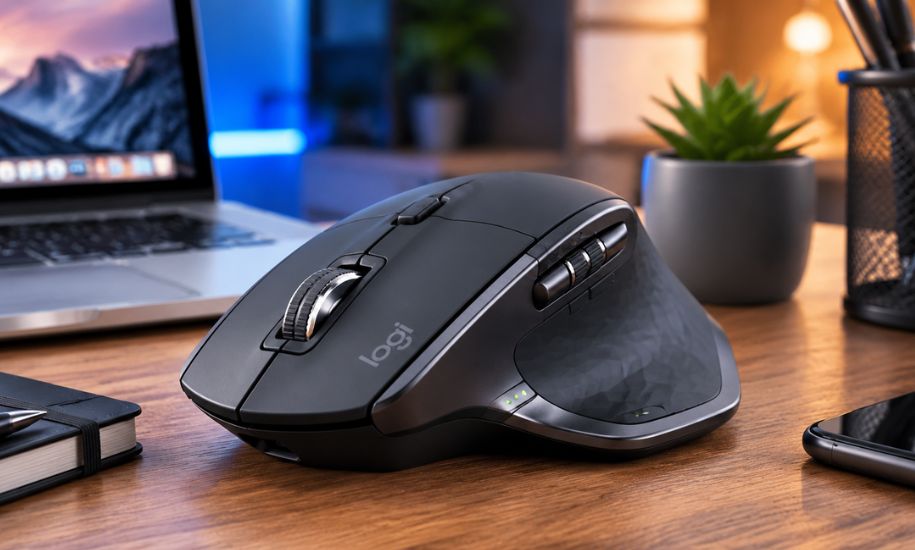
A reliable mouse can make a significant difference in daily productivity, whether you’re editing documents, designing graphics, writing code, or managing multiple applications. Among the many options available, the MX Master 2S has earned a lasting reputation for combining comfort, precision, and intelligent features into a single device. Although newer models have entered the market, this wireless mouse continues to attract professionals who value dependable performance and ergonomic design. Its combination of advanced tracking technology, long battery life, and seamless multi-device support has helped it remain a favourite for years.
What Makes the MX Master 2S Stand Out?
The MX Master 2S is designed primarily for productivity rather than gaming. Logitech developed it with office professionals, creative designers, engineers, programmers, and content creators in mind. Instead of focusing on flashy RGB lighting or ultra-lightweight construction, it emphasises comfort, workflow efficiency, and precision.
One of its defining characteristics is its sculpted ergonomic shape. Designed for right-handed users, it supports the natural position of the hand, reducing fatigue during extended working sessions. The thumb rest and strategically placed buttons allow quick access to frequently used functions without unnecessary hand movement.
Premium Design and Comfortable Ergonomics
The overall design reflects a premium approach. Soft-touch materials, solid construction, and carefully positioned controls contribute to a high-quality feel from the moment it is picked up.
Unlike smaller portable mice, this model is intended to support the entire palm. The larger profile encourages a relaxed grip, making it particularly suitable for professionals who spend several hours each day working at a computer.
The thoughtfully designed thumb wheel adds another level of convenience. Instead of relying solely on the primary scroll wheel, users can navigate horizontally through spreadsheets, timelines, and large documents with ease.
Advanced Tracking with Darkfield Technology
One of the mouse’s most impressive features is Logitech’s Darkfield laser sensor. Unlike conventional optical sensors that struggle on reflective surfaces, this technology enables accurate tracking on almost any surface, including glass.
The adjustable sensitivity ranges from 200 to 4,000 DPI, allowing users to tailor cursor movement according to their preferences. Whether working with detailed design software or handling everyday office tasks, the tracking remains smooth and responsive.
This versatility makes the device suitable for professionals who frequently change working environments or travel between home and office.
Multi-Device Connectivity
Modern professionals often use more than one computer throughout the day. The MX Master 2S addresses this need by allowing connections to up to three devices simultaneously.
Users can connect through Bluetooth or Logitech’s Unifying Receiver. Switching between paired devices requires only a press of the Easy-Switch button, making transitions between a desktop, laptop, or tablet quick and effortless.
This flexibility is especially valuable for individuals who regularly work across multiple operating systems.
Logitech Flow Improves Productivity
One of the standout software features is Logitech Flow, which extends functionality beyond a single computer.
Once configured, Flow allows users to move the cursor between compatible computers almost as if they were connected to a single display. Text, files, and images can be copied on one computer and pasted onto another without relying on external storage devices or cloud transfers.
For professionals working across Windows and macOS systems, this feature can significantly streamline daily workflows.
Long Battery Life for Everyday Use
Battery performance remains one of the strongest aspects of this wireless mouse.
A fully charged battery can last up to approximately 70 days under normal usage conditions. This reduces interruptions and eliminates the inconvenience of frequent charging.
Even when power runs low, a quick one-minute charge provides enough energy for several hours of work, allowing users to continue without lengthy downtime.
Although charging takes place via Micro-USB rather than USB-C, the excellent battery endurance helps offset this limitation.
Customisable Controls
Efficiency often depends on reducing repetitive actions, and the programmable buttons help achieve exactly that.
Using Logitech’s companion software, users can assign custom shortcuts to individual buttons based on the applications they use most frequently.
Popular customisations include:
- Copy and paste shortcuts
- Browser navigation
- Media playback controls
- Zoom functions
- Desktop switching
- Application-specific commands
Creative professionals using software such as Adobe Photoshop, Premiere Pro, or AutoCAD often benefit from personalised shortcuts that reduce repetitive mouse movements.
Everyday Performance
Daily performance is where this mouse continues to impress years after its release.
Cursor tracking remains highly accurate, scrolling feels precise, and button placement supports efficient navigation throughout demanding workloads. The combination of horizontal and vertical scrolling proves especially useful for spreadsheet users, financial analysts, video editors, and designers.
The overall responsiveness contributes to a smooth user experience during routine office tasks, creative projects, and professional workflows.
While it is capable of casual gaming, it was never intended to compete with specialised gaming mice featuring lightweight designs and extremely high polling rates.
MX Master 2S Compared with Newer Models
As Logitech introduced newer generations, many buyers naturally compare this model with the MX Master 3 and MX Master 3S.
The newer versions offer several refinements, including USB-C charging, quieter click switches, a higher DPI sensor, and Logitech’s MagSpeed electromagnetic scrolling wheel.
However, many of the core strengths remain unchanged. Comfortable ergonomics, multi-device connectivity, exceptional battery life, and productivity-focused features continue to make the earlier model highly capable.
For users who can purchase it at a competitive price, it still represents excellent value without sacrificing essential functionality.
Advantages
Several qualities have contributed to its long-lasting popularity:
- Comfortable ergonomic design
- Excellent build quality
- Reliable wireless connectivity
- Long battery life
- Precise Darkfield tracking
- Multi-device support
- Customisable controls
- Smooth horizontal scrolling
- Strong productivity software integration
Limitations
Despite its strengths, there are a few drawbacks to consider.
The mouse is heavier than many modern alternatives, making it less suitable for users who prefer lightweight peripherals. The use of Micro-USB instead of USB-C also feels dated by today’s standards.
Its size may not be ideal for people with smaller hands, and competitive gamers will generally find dedicated gaming mice more responsive for fast-paced titles.
Who Should Consider Buying It?
This mouse remains an excellent choice for professionals who prioritise comfort and productivity.
It is particularly suitable for:
- Office professionals
- Software developers
- Graphic designers
- Video editors
- Architects
- Engineers
- Financial analysts
- Students
- Content creators
- Business users managing multiple computers
Anyone who spends long hours working at a desk will likely appreciate its ergonomic design and productivity-focused features.
Is the MX Master 2S Still Worth Buying?
Although several years have passed since its introduction, the MX Master 2S continues to deliver outstanding value for professional users. Its combination of reliable wireless performance, excellent ergonomics, long-lasting battery, advanced tracking technology, and intelligent software features allows it to remain competitive even alongside newer productivity mice.
For buyers who do not require USB-C charging or the latest silent-click technology, it remains a dependable investment capable of improving comfort and efficiency throughout the working day.
As technology continues to evolve, some devices quickly become outdated, while others earn a reputation for timeless practicality. The MX Master 2S belongs firmly in the latter category, offering a balanced combination of comfort, precision, and productivity that still satisfies the needs of many professionals. At Insider Newz, we continue to explore trusted technology that delivers genuine value, helping readers make informed decisions based on performance rather than trends.




