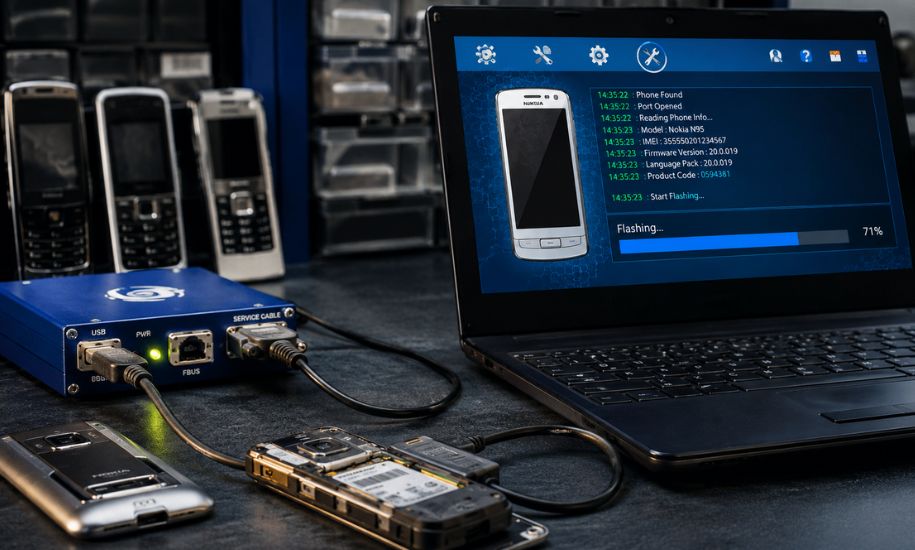
The mobile phone repair industry has evolved significantly over the years, but some tools continue to hold historical and practical importance. One such solution is 5 Advance Turbo Flasher, a professional servicing tool that became widely recognised among technicians working with Nokia devices. Designed to simplify firmware flashing, software repair, and device recovery, it helped repair centres perform complex tasks with greater efficiency. Although newer servicing platforms have emerged, this version remains a point of reference for enthusiasts, technicians, and collectors interested in classic mobile repair technology.
What Is 5 Advance Turbo Flasher?
5 Advance Turbo Flasher, often referred to as ATF v5, is a software and hardware-based mobile servicing solution created primarily for Nokia phones. Unlike standard PC software, it works alongside a dedicated hardware box that communicates directly with compatible devices through USB or FBUS connections.
Its primary role is to install firmware, recover malfunctioning phones, perform factory resets, and repair software-related issues. During the era of feature phones and early smartphones, it became an essential tool for professional repair workshops because it combined speed, stability, and broad compatibility.
Key Features of the Software
One reason this servicing platform gained recognition was its comprehensive collection of repair functions. Instead of focusing on a single task, it provided technicians with several useful capabilities in one package.
Some of its standout features include:
- Fast firmware flashing
- Dead phone recovery
- USB and FBUS support
- Device information reading
- Factory reset functions
- Software repair utilities
- Firmware verification
- Stable communication with supported hardware
- Improved flashing engine for compatible Nokia devices
These features helped reduce repair time while improving the success rate of software restoration.
Supported Devices
Although primarily associated with Nokia products, the software supported several generations of handsets.
Commonly supported device families included:
- Nokia BB5 phones
- Nokia DCT4 models
- Nokia N900
- Various Symbian-based smartphones
- Selected feature phones
Support depended on both the software version and the available firmware files. Repair professionals typically maintained extensive firmware libraries to ensure compatibility with different models.
How the Flashing Process Works
Firmware flashing replaces or reinstalls the operating software stored inside a mobile device. This process is often used when a phone experiences software corruption, boot loops, failed updates, or startup errors.
A typical workflow involves:
- Installing the ATF software.
- Connecting the ATF hardware box.
- Installing the necessary drivers.
- Connecting the phone using the appropriate cable.
- Selecting the correct firmware package.
- Starting the flashing procedure.
- Waiting for verification and completion.
- Restarting the repaired device.
Choosing the correct firmware version is essential because installing incompatible software can prevent a phone from functioning properly.
Advantages for Mobile Repair Professionals
Professional technicians appreciated this tool for several practical reasons.
Reliable Performance
The software earned a reputation for stable communication between the computer and supported devices, reducing interruptions during firmware installation.
Faster Repair Times
The Turbo Flashing engine was designed to optimise data transfer speeds, allowing repair shops to complete multiple devices more efficiently throughout the working day.
Comprehensive Service Functions
Instead of using separate utilities for reading information, flashing firmware, and resetting devices, technicians could perform many servicing tasks within a single interface.
Hardware Authentication
Unlike purely software-based flashing programs, the dedicated hardware box provided secure authentication and improved communication with supported phones.
Common Uses in Repair Workshops
During its peak years, repair centres relied on the software for many everyday servicing tasks.
Typical applications included:
- Repairing phones stuck on the startup logo
- Recovering devices after failed firmware updates
- Reinstalling operating software
- Performing factory resets
- Reading product information
- Diagnosing software faults
- Restoring phones that would not boot normally
Because software failures were common on older feature phones and Symbian devices, these functions became valuable for independent repair businesses.
System Requirements
Running the software did not require particularly powerful hardware, making it accessible for many repair shops.
Typical requirements included:
- Windows XP
- Windows Vista
- Windows 7
- USB ports
- Installed Nokia USB drivers
- Compatible Advance Turbo Flasher hardware box
As newer versions of Windows became available, some users required updated drivers or compatibility settings to continue using legacy repair software.
Why Firmware Accuracy Matters
One of the most important aspects of mobile servicing is selecting the correct firmware package.
Every phone model may have multiple regional versions, language packs, and hardware revisions. Installing an incorrect firmware file can cause problems such as:
- Boot failures
- Missing language options
- Network compatibility issues
- Device instability
- Interrupted flashing procedures
Experienced technicians always verified the phone model and firmware before beginning any repair operation.
Differences Between Version 5 and Later Releases
As mobile technology advanced, later releases of Advance Turbo Flasher introduced several improvements beyond those available in Version 5.
Newer editions generally included:
- Expanded device compatibility
- Improved USB flashing support
- Better driver integration
- Additional Lumia servicing tools
- Faster flashing algorithms
- Enhanced software stability
- Support for newer Nokia firmware releases
While Version 5 remains significant historically, later updates reflected the industry’s transition from feature phones to Windows Phone devices.
Best Practices for Safe Flashing
Although firmware servicing is a routine procedure for professionals, following proper practices helps minimise risks.
Recommended precautions include:
- Use genuine firmware files.
- Keep the computer connected to a reliable power source.
- Avoid disconnecting cables during flashing.
- Confirm model compatibility before starting.
- Install the latest compatible drivers.
- Back up important user data whenever possible.
Careful preparation greatly increases the likelihood of a successful repair.
Is 5 Advance Turbo Flasher Still Relevant Today?
Modern smartphones use entirely different security systems, processors, and flashing methods compared with older Nokia devices. As a result, current repair technicians often rely on newer servicing platforms designed for Android and other operating systems.
However, 5 Advance Turbo Flasher continues to have value for several groups:
- Technicians repairing legacy Nokia phones
- Mobile repair training centres
- Collectors restoring vintage devices
- Electronics enthusiasts interested in classic servicing equipment
- Workshops maintaining older handset inventories
Its historical role in professional mobile servicing makes it an important part of the evolution of phone repair technology.
Final Thoughts
Although mobile repair tools have advanced considerably, the legacy of 5 Advance Turbo Flasher remains noteworthy. Its combination of reliable firmware flashing, software recovery, hardware integration, and broad Nokia compatibility made it one of the preferred solutions for many professional technicians during its time. Understanding how it worked also provides useful insight into the development of modern mobile servicing technology. At Insider Newz, we continue to explore both classic and emerging technologies that have shaped the digital world and the repair industry.




