
The moving camera creates normal scenes into visual experiences. A smooth motion adds to the storytelling, focuses attention, and adds cinematic appeal in various video styles. Prompt-based controls make this easier by specifying the camera’s actions in plain English rather than by hand-animating them. Pippit not only offers prompt-driven video generation but also provides flexible editing features, empowering creators to craft videos with efficiency and precision in terms of camera speed, direction, and viewing angles. The subsequent sections describe some practical ways of setting up smooth camera moves with structured prompts.
Why Camera Speed and Angles Matter in AI Video Creation
In every scene, camera movement directly affects how the audience will absorb the scene. Smooth motion enhances visual storytelling by subtly showing key details. Balanced camera speed helps to maintain attention without distracting. Carefully selected viewing angles create realistic spatial relationships and depth. Even movements that are repeated enhance the realism of the motion in the various environments and actions. Emotion is also enhanced through thoughtful framing during dramatic, educational, or promotional content. When prompts explicitly outline how the AI should behave, how fast the camera should move, from what angle to capture the scene, how the subject should interact with the camera, and how the shots should transition. The purpose of the scene from start to finish, the AI video generator can be capable of supporting these creative goals.
Understanding Prompt-Based Camera Controls
Prompt-based camera control begins with clear descriptions instead of technical animation settings. Use everyday, action words to describe direction of movement for predictable response. Use words such as slow, gentle, steady, and gradual to vary speed naturally. Use eye level, overhead, close, wide, and side views. Use camera movement and actions of the characters to create visual flow that seems believable. Ensure consistency in storytelling through movement by pairing each movement to the purpose of the scene. Try to keep transitions between shots smooth, without giving contradictory instructions. Test prompts and refine until movement is balanced. Pippit can be used with multiple Dreamina models such as Seedance 2.5 for different styles of creative camera moves.
Types of Camera Movements You Can Describe in Prompts
Various camera moves convey various visual intentions. Slow zoom movements focus on key subjects, slowly over time, without overloading viewers. Tracking shots are used to track moving subjects with natural pacing. Pan & tilt directions show the surrounding environment that can move continuously. Establishing shots are wide shots that reveal locations before more visual information is provided. Close-up shots, which focus on the face or product details, can be effective in capturing expressions or showcasing features. Overhead and aerial angles have greater spatial awareness over larger scenes. Dynamic reveal shots are shots that reveal significant objects or environments in a gradual manner for dramatic purposes. Clear subject actions and realistic timing enhance the effectiveness of each movement.
Steps to Control Camera Speed and Angle Smoothly with Prompt-Based AI Video Generator
Step 1: Define Camera Movement Prompts
- “Sign up” for Pippit using your Google, TikTok, or Facebook account.
- Access the “More” tab and open “Video generator”.
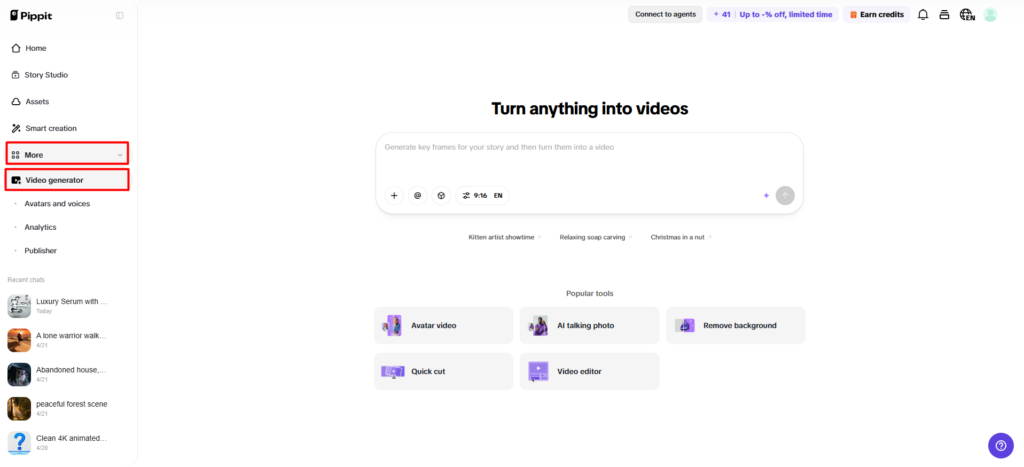
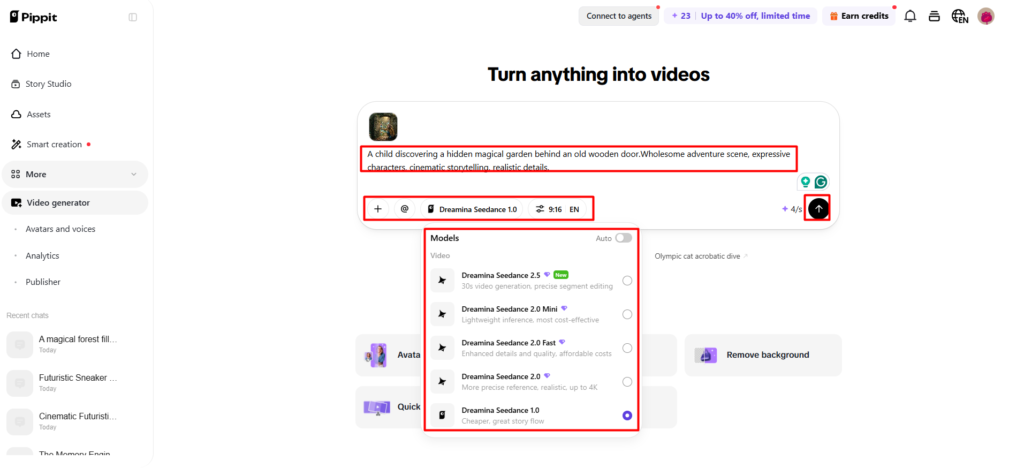
- Select an AI model like Dreamina Seedance 1.0, Dreamina Seedance 2.0, Dreamina Seedance 2.0 Fast, Dreamina Seedance 2.0 Mini, or Dreamina Seedance 2.5.
- Write a detailed prompt describing camera speed, angles, and movements.
- Choose video length, language, subtitles, and aspect ratio.
- Click “+” to upload reference images or videos from your device, phone, Dropbox, or a link. You can also select assets if you don’t have reference media.
- Click “Generate”.
Step 2: Generate Smooth Camera Shots
- After clicking “Generate”, Pippit’s AI video generator creates a video based on your prompt and references.
- The AI handles transitions, pacing, captions, avatars, voice, lyrics, and visual enhancements.
- Review the draft for smooth camera movement.
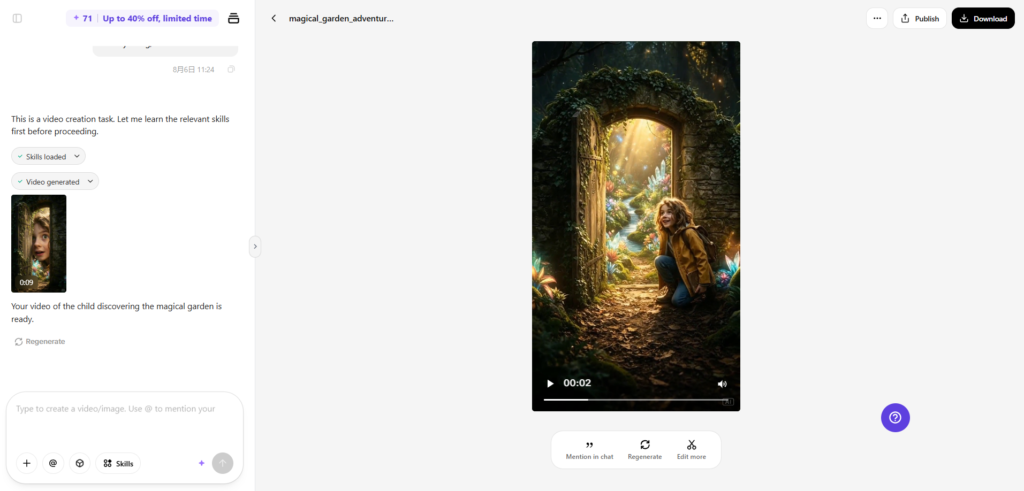
Step 3: Refine and Export
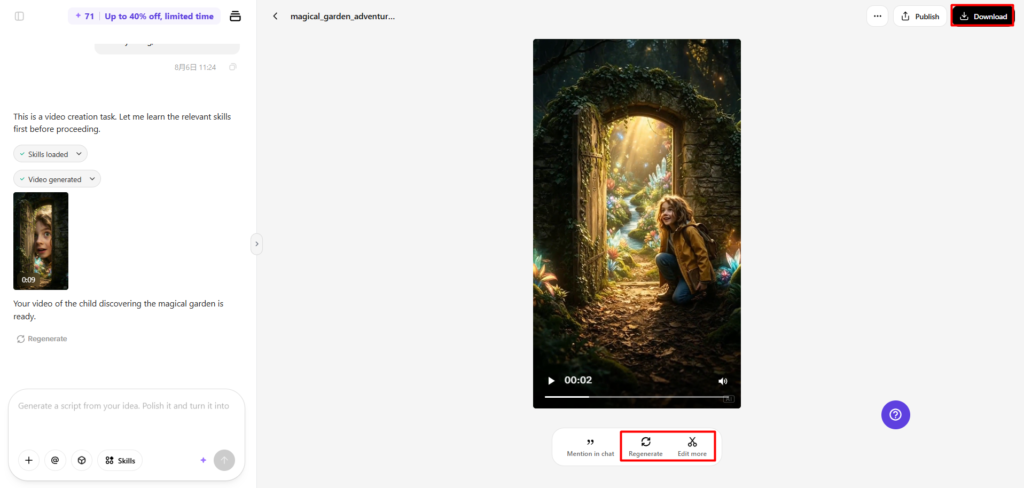
- Click the “Download” tab to save the video, choose “Regenerate” for a new version, or click “Edit more” for adjustments.
- Edit captions and modify text, size, colors, alignment, filters, and effects.
- Add background music, remove backgrounds, and enhance visuals.
- Click “Export”.
- Select “Publish” to share on TikTok, Instagram, or Facebook, or click “Download” to save with your preferred quality settings.
Pippit Features That Support Better Camera Control
Pippit has a number of features that make smoother camera movements in creative projects easier.
- Prompt-based scene editing is a simple text-based camera movement update.
- The higher the model number, the more different visual styles are generated for the different creative needs.
- Using reference images to support framing helps to make it more consistent and preferred for the scene composition.
- The automatic motion enhancement optimizes transitions and even out movement pacing naturally.
- The editing tools are flexible, making it easy to make visual adjustments after the initial video has been produced.
- Several export options prepare videos for various platforms and resolutions.
Best Practices for Smooth Camera Motion
A significant amount of camera movement depends on planning that takes place before any generation. Sync camera pace with action in the scene to maintain realistic pacing in the visuals. Prevent sudden perspective changes, as it disrupts viewing comfort. Use the same positioning of the subjects when moving from one scene to another to enhance continuity. Use a mix of wide and closer shots to create a better variety for storytelling. Carefully check the motion created by the review prior to export, as small changes can make a difference in visual quality. With built-in editing tools, Pippit makes it simple to make these refinements, which can be made efficiently without compromising the overall scene consistency.
Avoiding Common Camera Prompt Mistakes
Clear prompts minimize the need for unnecessary revisions and enhance the quality of the generated text. Do not combine camera directions that contradict each other, as this will make visual interpretation more difficult. Ask for a reasonable pace instead of the impossible in the movies. Pay close attention to scene timing, movement of the camera should match the subject’s movement naturally. Provide prompts that are focused, not too many instructions in one prompt. Check footage to make sure things are as practical as possible, as this supports the overall presentation. Typically, minor tweaks lead to more consistent results than starting from scratch to rewrite all of the camera instructions.
Emerging Trends in AI-Controlled Camera Movement
A new generation of cameras is still being developed that capture and immediately interpret motion. The more accurate the motion prediction, the more seamless the scene transitions between the scenes. Better film framing makes for better composition in a variety of creative formats. Dynamic Angles with AI is more responsive if the subjects move. Interpretation is also continually improving, and more detailed camera instructions are being recognized. Optimization of creative automation of camera settings for reduced repetitive adjustments, while still maintaining creative flexibility. These improvements allow creators to create polished visuals with less effort and more consistency across their projects.
Conclusion
The smooth camera transitions and well-planned viewing angles enhance the quality of AI-generated videos. This provides greater cinematographic visual effects, prompts, realistic motion planning, and thoughtful refinements. Regular testing also helps make more precise movements in various scenes and creative styles. The various Dreamina models of Pippit and prompt-based camera controls, in conjunction with the built-in editing functions, facilitate professional video production and guarantee efficient creative workflows for different video content requirements.




