iScreen Widgets App: Transform Your Home Screen with Interactive Widgets, Aesthetic Wallpapers, and Custom App Icons

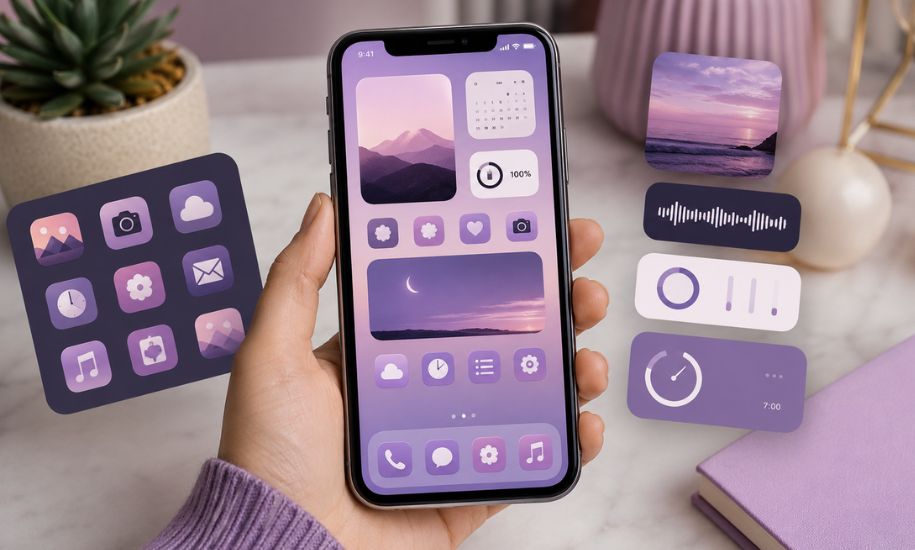
Your smartphone is one of the devices you use most throughout the day, so it’s no surprise that many people want it to reflect their personality and style. While default home screens are functional, they often lack creativity and customization. That’s where the iScreen Widgets App comes in. Designed for users who enjoy personalizing their devices, the app offers an impressive collection of interactive widgets, aesthetic wallpapers, custom app icons, and complete theme packs that can transform an ordinary home screen into something unique and visually appealing.
Whether you’re looking for a clean minimalist design, colorful seasonal themes, or productivity-focused widgets, this customization platform provides tools that make it easy to create a home screen tailored to your preferences.
What Is the iScreen Widgets App?
The iScreen Widgets App is a mobile customization application available for both iOS and Android devices. It brings together a wide variety of design elements, including home screen widgets, lock screen widgets, wallpapers, icon packs, and interactive features in one convenient platform.
Rather than requiring users to install multiple customization apps, iScreen combines these tools into a single experience. This makes it easier to design a coordinated home screen where wallpapers, icons, and widgets complement one another.
Its user-friendly interface also means beginners can quickly personalize their devices without advanced technical knowledge.
Interactive Widgets That Do More Than Display Information
One of the app’s biggest strengths is its collection of interactive widgets. Unlike traditional widgets that simply display information, these allow users to perform quick actions directly from the home screen.
Popular widget options include:
- Digital and analog clocks
- Calendar planners
- Weather forecasts
- Battery monitors
- Countdown timers
- Daily habit trackers
- To-do lists
- Sticky notes
- Step counters
- Launcher shortcuts
Many widgets are designed with attractive animations and modern layouts, making them both practical and visually appealing. Users can check important information at a glance without constantly opening individual apps.
Aesthetic Wallpapers for Every Style
A wallpaper sets the tone for the entire home screen, and iScreen offers a large library to suit different tastes.
Users can choose from themes such as:
- Minimalist designs
- Nature photography
- Abstract artwork
- Space scenes
- Anime-inspired illustrations
- Pastel color palettes
- Dark mode backgrounds
- Seasonal collections
- Cute cartoon styles
- Neon-inspired graphics
Many wallpapers are designed to coordinate with matching widgets and icon packs, creating a polished appearance across the entire interface.
For those who enjoy creativity, the app also provides editing tools that make it possible to customize wallpapers with different layouts, colors, and visual effects.
Custom App Icons for a Consistent Look
Standard app icons often feature different colors and design styles that can make a home screen appear cluttered. The iScreen Widgets App solves this by offering complete icon packs designed around specific themes.
Popular icon styles include:
- Glass effects
- Modern minimal icons
- Luxury-inspired collections
- Soft pastel colors
- Vintage designs
- Transparent icons
- Dark monochrome themes
- Cartoon-inspired icons
Instead of changing icons individually, users can apply coordinated packs that maintain visual consistency throughout their device.
Complete Theme Collections
For users who want an effortless customization experience, the app provides ready-made themes that combine wallpapers, widgets, icons, and color schemes into one package.
These themes are designed around different aesthetics, including:
- Minimalist workspaces
- Nature-inspired layouts
- Gaming themes
- Productivity-focused dashboards
- Cozy seasonal designs
- Elegant luxury styles
- Cute and playful collections
Applying a complete theme saves time while ensuring every design element works together harmoniously.
Lock Screen Personalization
Modern smartphones allow much more flexibility on the lock screen than in previous years, and iScreen takes full advantage of these capabilities.
Users can add widgets that display:
- Current weather
- Calendar events
- Battery percentage
- Daily reminders
- Motivational quotes
- Clock styles
- Fitness statistics
- Launcher shortcuts
These additions help users access useful information without unlocking their phones while also giving the lock screen a distinctive appearance.
Dynamic Island and Interactive Features
For compatible iPhone models, the app expands the possibilities of Dynamic Island customization.
Available features may include:
- Animated pets
- Decorative plants
- Countdown displays
- Weather information
- Calendar reminders
- Personalized text
- Launcher shortcuts
These additions provide another layer of personalization while making use of Apple’s newer interface elements.
DIY Customization Options
Not everyone wants to rely solely on pre-made themes. One of the reasons many users appreciate iScreen is its DIY customization tools.
These allow users to:
- Create personalized widgets
- Design unique wallpaper layouts
- Combine different icon packs
- Customize fonts and colors
- Adjust widget sizes
- Arrange elements for better organization
This flexibility encourages creativity while giving every home screen a personal touch.
Easy Setup Process
Despite offering numerous customization options, the app is designed to remain beginner-friendly.
The general setup process involves:
- Selecting a preferred widget or theme.
- Customizing colors or layouts if desired.
- Saving the design.
- Adding the widget through the device’s widget menu.
- Positioning it on the home or lock screen.
Most users can complete the process within a few minutes, making it accessible even for those who have never customized their devices before.
Free and Premium Features
The application offers both free and premium experiences.
The free version provides access to many wallpapers, widgets, and basic customization features. This makes it suitable for users who want to explore the platform before making a commitment.
The premium subscription unlocks a wider selection of exclusive content, including advanced widgets, premium icon packs, additional themes, expanded customization tools, and regularly updated design collections.
Choosing between the two depends on how extensively a user wants to personalize their device.
Advantages of Using iScreen
Several factors contribute to the app’s growing popularity among smartphone users.
Some notable advantages include:
- Large collection of professionally designed widgets
- Extensive wallpaper library
- Beautiful icon packs
- Complete coordinated themes
- Interactive home screen elements
- Regular content updates
- Beginner-friendly interface
- Support for both productivity and creative customization
By combining functionality with attractive design, the app helps users create a home screen that feels both practical and personal.
Is the iScreen Widgets App Worth Trying?
For anyone who enjoys personalizing their smartphone, the iScreen Widgets App offers an impressive balance of design, convenience, and functionality. Instead of relying on multiple applications for wallpapers, icons, and widgets, users can manage nearly every aspect of their home screen from one platform.
Its combination of interactive widgets, aesthetic wallpapers, customizable icon packs, lock screen enhancements, and complete themes makes it suitable for casual users as well as enthusiasts who enjoy experimenting with different layouts. Regular updates and fresh content further increase its appeal, ensuring that users always have new designs to explore.
If creating a stylish and organized smartphone experience is important to you, this app provides an excellent set of tools to achieve that goal.
At Insider Newz, we aim to bring readers informative guides on the latest apps, technology, and digital trends. Whether you’re exploring customization tools or discovering useful mobile applications, our goal is to provide practical insights that help you make informed choices.



